
Introduction
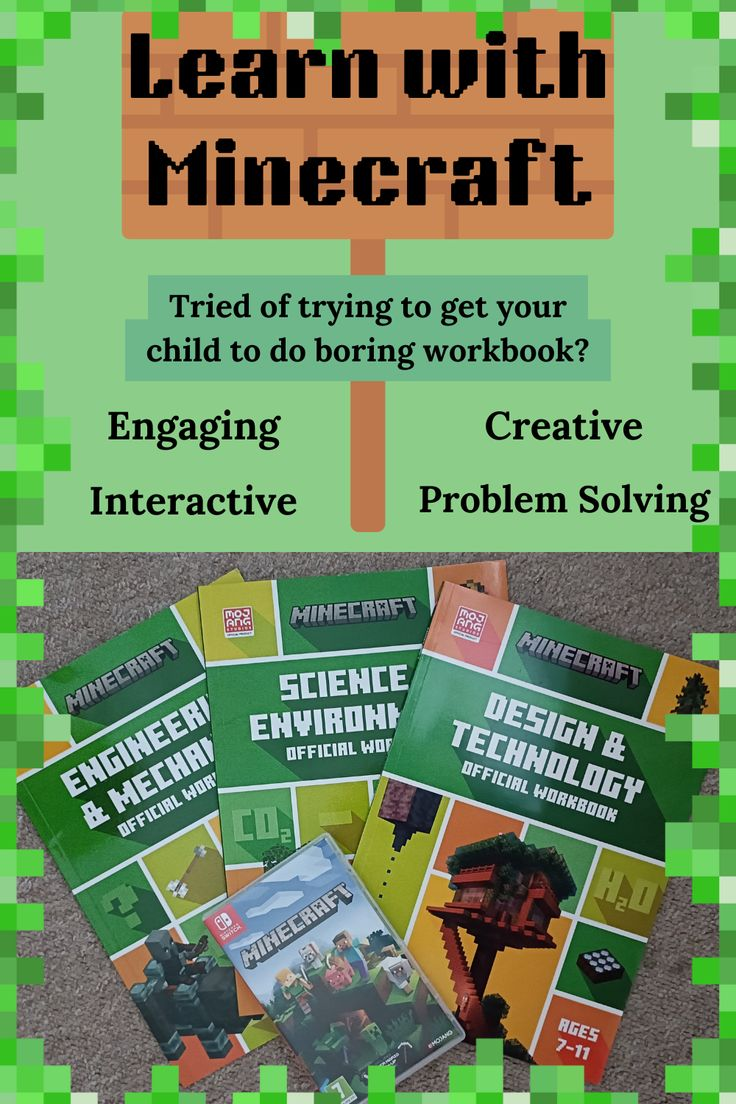
Learning becomes more exciting when students can explore, build, and solve challenges in an interactive world. Minecraft Education lessons help teachers create engaging activities that combine creativity with real academic goals. From science experiments to history projects, learners develop practical skills while enjoying hands-on experiences. Beginners appreciate the simple learning curve, while experienced educators enjoy the platform’s flexibility. This guide explains what these lessons are, why they matter, and how to use them effectively for meaningful classroom success.
What is Minecraft Education Lessons?
Minecraft Education lessons are structured learning activities created within Minecraft Education. They combine educational objectives with interactive gameplay to teach subjects such as mathematics, science, geography, coding, language arts, and history. Teachers can use ready-made lesson plans or design custom activities that match curriculum requirements. Students collaborate, solve problems, and complete projects while exploring a safe digital environment that encourages curiosity and creativity.
Why is Minecraft Education Lessons Important?
Modern classrooms benefit from active learning instead of passive memorization. Minecraft Education lessons encourage students to think critically, communicate effectively, and work together. They also support different learning styles by combining visual, practical, and creative experiences. For example, students can recreate ancient cities, build ecosystems, or program simple game mechanics while developing valuable digital skills that extend beyond the classroom.
Step-by-Step Guide
1. Install the Platform
Download Minecraft Education and sign in using a supported school or educational account. Verify that devices meet the required system specifications before beginning.
2. Choose a Lesson
Browse the lesson library and select activities that align with your teaching goals. Beginners should start with simple projects before exploring advanced challenges.
3. Prepare the Classroom
Introduce learning objectives, explain controls, and demonstrate basic gameplay. Setting expectations early helps students stay focused during activities.
4. Encourage Collaboration
Divide learners into small groups where they can discuss ideas, share responsibilities, and solve problems together. Teamwork improves communication and engagement.
5. Review Learning Outcomes
After completing activities, ask students to present their creations, explain decisions, and reflect on what they learned. Assessment becomes more meaningful through discussion and demonstration.
Benefits
- Increases student engagement through interactive learning.
- Develops creativity and problem-solving abilities.
- Supports teamwork and communication skills.
- Makes complex subjects easier to understand.
- Encourages critical thinking and independent exploration.
- Integrates coding, STEM, and digital literacy naturally.
- Provides flexible lessons for different age groups.
Risks or Disadvantages
- Requires compatible devices and reliable internet in many classrooms.
- Some students may become distracted without clear guidance.
- Teachers need time to learn platform features.
- Technical issues can interrupt planned activities.
- Classroom management remains important during collaborative gameplay.
Common Mistakes to Avoid
Many educators focus only on gameplay instead of learning outcomes. Always connect activities to specific educational goals. Avoid introducing complicated projects too early, as beginners benefit from gradual progression. Encourage equal participation so every student contributes. Regularly review completed work and provide constructive feedback. Planning lessons carefully ensures that Minecraft Education lessons remain educational rather than simply entertaining.
FAQs
What subjects support Minecraft Education lessons? Science, mathematics, history, geography, language arts, coding, and many others.
Are Minecraft Education lessons suitable for beginners? Yes. Many starter activities include clear instructions and simple objectives.
Can teachers create custom lessons? Yes. Educators can design personalized worlds and assignments matching classroom needs.
Do students need gaming experience? No. Basic controls are easy to learn with short practice sessions.
Expert Tips
Start with small classroom projects before introducing complex challenges. Use discussion questions before and after each activity to reinforce learning. Combine virtual tasks with written reflections or presentations for deeper understanding. Update lesson plans regularly by including seasonal themes or cross-curricular projects. Most importantly, encourage curiosity, experimentation, and respectful collaboration because these habits help students gain lasting knowledge through Minecraft Education lessons while building confidence, creativity, responsibility, and practical skills for future academic success.
Conclusion
Education becomes more memorable when students actively participate instead of simply reading textbooks. Minecraft Education lessons offer an engaging way to combine creativity, teamwork, and curriculum-based learning in one interactive environment. Whether teaching coding, science, history, or mathematics, educators can adapt activities to suit different ages and abilities. By planning lessons carefully, encouraging collaboration, and reviewing outcomes, teachers can create enjoyable experiences that inspire curiosity, strengthen essential skills, and support long-term academic growth for every learner.